Are you a proud owner of a new iPhone or maybe you are considering purchasing a secondhand one? Regardless, you want to be sure it is real. Nobody wants a fake iPhone, or one that has been tampered with. This is common, especially with us living in a world where scams and counterfeit items are so prevalent. After we go over this article, you will have three easy ways to check that your iPhone is authentic.
If you simply follow the steps and methods below, you can check if an iPhone is real:
Method 1: Check the Serial Number
Verify the device’s serial number on Apple’s website to ensure it is legitimate.
Step 1: Open the “Settings” app on your iPhone.
Step 2: Scroll down and select “General”.
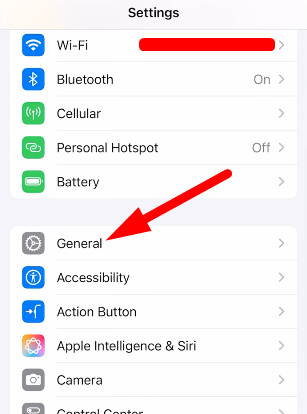
Step 3: Tap on “About”.

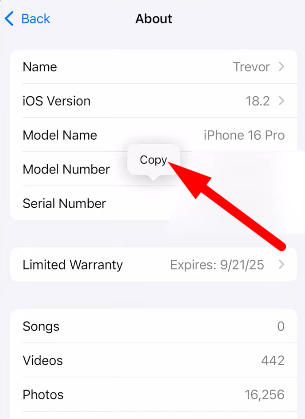
Step 4: Verify that the “Model Name” is correct for the iPhone.
Step 5: Press and hold the “Serial Number” and copy the serial number into memory.
Step 6: Go to Apple’s website “https://checkcoverage.apple.com” and search for “Apple Serial Number Lookup”.

Step 7: Enter the serial number and click “Submit”.

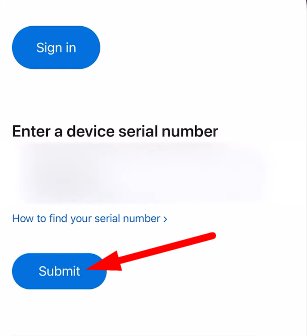
Step 8: Once your serial number is entered, a positive sign that it is a real iPhone, is if it recognizes your serial number and lists the iPhone model correctly.
Method 2: Check App Store Authentication
To verify that the iPhone can successfully connect to Apple’s servers, download an app from the App Store.
Step 1: Open the “App Store” on your iPhone.
Step 2: Press the “Profile” button located at the top right corner.
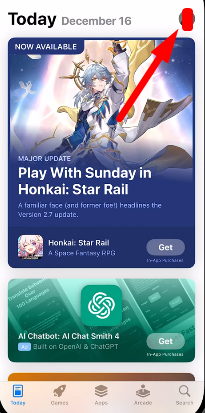
Step 3: Make sure you are signed into your Apple ID.
Step 4: Download and install some free app (e.g., a string of possible choices: a game or utility app)..
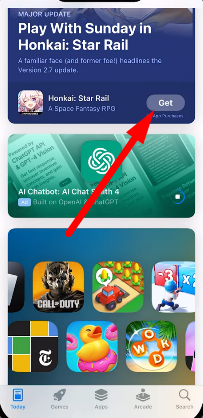
Step 5: If the app can be downloaded and successfully installed, this means that the iPhone is probably real and capable of authenticating with Apple’s servers.
Method 3: Check Siri Functionality
To check that the iPhone is connected to Apple’s servers, activate Siri and ask a question.
Step 1: Open “Settings” on your iPhone.
Step 2: Scroll down and click on “Apple Intelligence & Siri”.
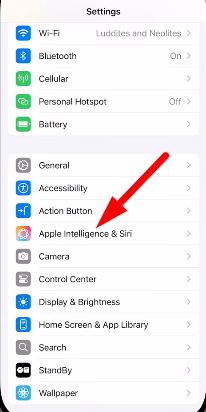
Step 3: Make sure that Press Home for Siri or “Allow Siri When Locked” is turned on (yeah the same can also be done by clicking on Talk to Siri).
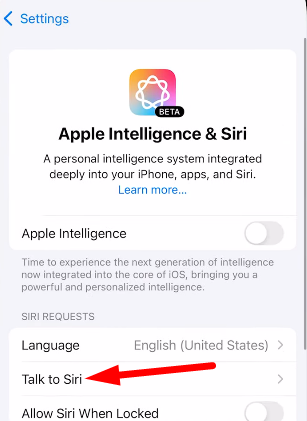
Step 4: Activate Siri by either pressing the “Side” button or saying “Hey Siri”.

Step 5: Ask Siri a question. To help with the test, try: What is the weather today in your city?

Step 6: If Siri responds with a valid answer to your question, then you can rest assured that your iPhone is real and you are indeed connected to Apple’s servers.
Conclusion:
So, there you go! Now, you know three simple steps to check if your iPhone is authentic. You can have peace of mind that your iPhone is real by checking the serial number, authenticating from the App Store, or verifying if you can access Siri. Just remember, it’s always better to be safe than sorry, especially with something so personal and valuable as your iPhone.
Frequently Asked Questions (FAQs):
1. What happens if my iPhone serial number is not recognized by Apple?
If your iPhone serial number is not recognized, you may likely have a counterfeit, stolen, or modified phone. You should contact Apple support for further assistance.
2. Can I use these methods to check the authenticity of other Apple devices?
Yes, you can use similar steps for other Apple devices, such as iPads, Apple Watches, and other Macs, but make sure to follow the proper steps to check on each specific device.
3. What if I’m buying a used iPhone? How can I ensure it’s authentic?
Whichever process you use to buy a secondhand iPhone, always verify the serial number, ask the seller for the receipt, and check the iPhone for any physical signs of damage or text indication of tampering.
4. Is it possible that the ‘iPhone’ could work even though it is inauthentic?
You can count on the fact that with a counterfeit replica, there is a chance the device may or may not work properly, but you will not get any future software updates, and device performance and security could be compromised.
5. What steps should I take if I feel like my iPhone is not real?
Should you feel your iPhone may not be genuine you should contact Apple support immediately and report the issue. Apple Support can assist you in determining if the iPhone is authentic and the best course of action going forward.



![Can I Access My Husband's Verizon Text Messages [Updated]](https://techteachs.com/wp-content/uploads/2024/04/Can-I-Access-My-Husbands-Verizon-Text-Messages-Updated.png)